Orbit Pro 1.5 timeline — full multitrack ADM/IAMF with per-track solo, markers, 3D scene and activity
Pro · macOS 14+ · One-time

The most capable Orbit yet.

Everything in Orbit, plus IAMF / Eclipsa export, a full multitrack timeline and a built-in video editor. One purchase, no subscription.

ADM BWFDolby AtmosEBU ADMIAMFEclipsa AudioOSLS
Watch the film
Inside Pro 1.5

Finish it, export it, prove it.

Orbit reads the master. Pro is what you reach for when you have to do something with it.

Timeline

Every track, down to the object

Find the silent object before your client does.

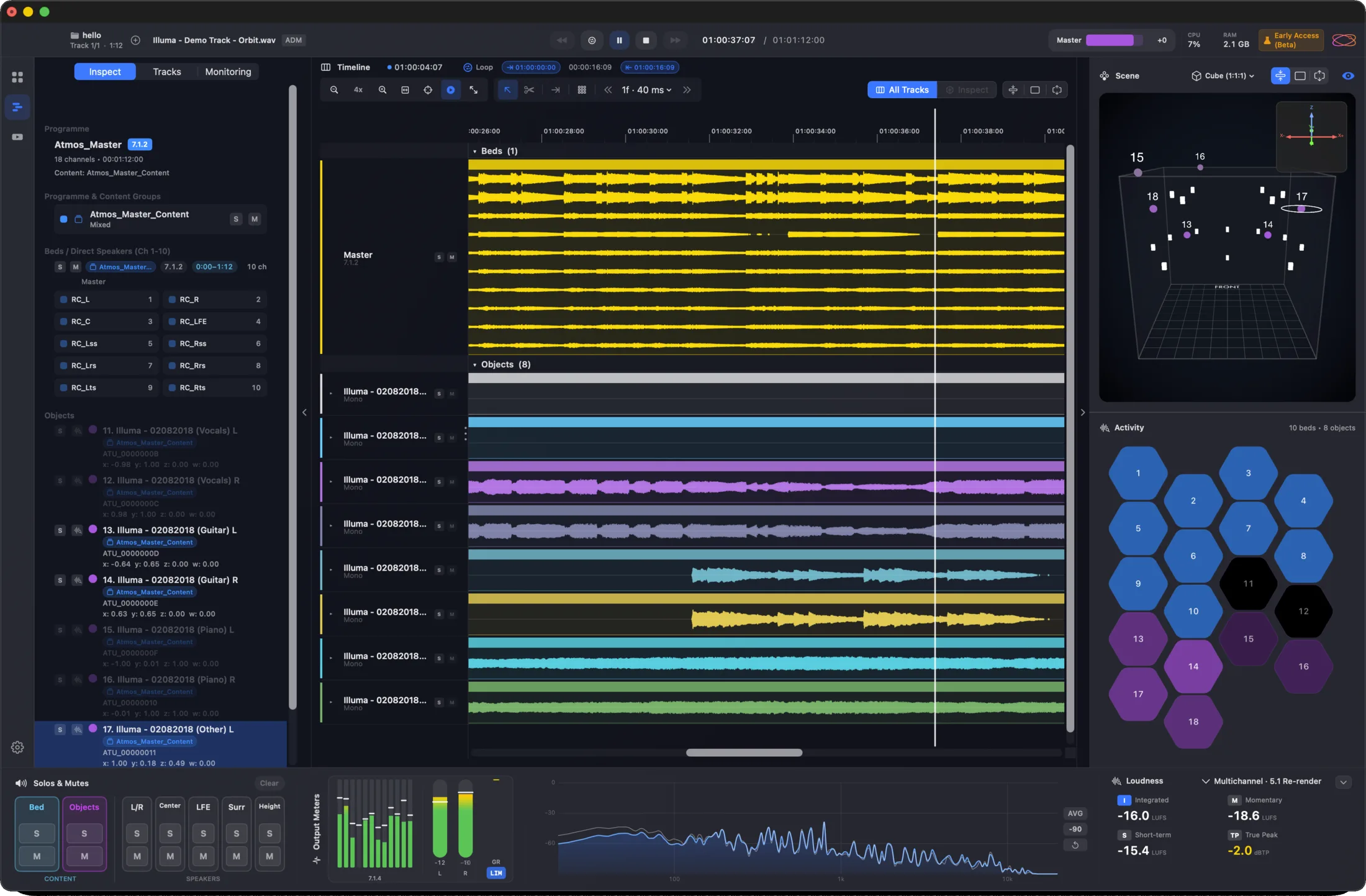
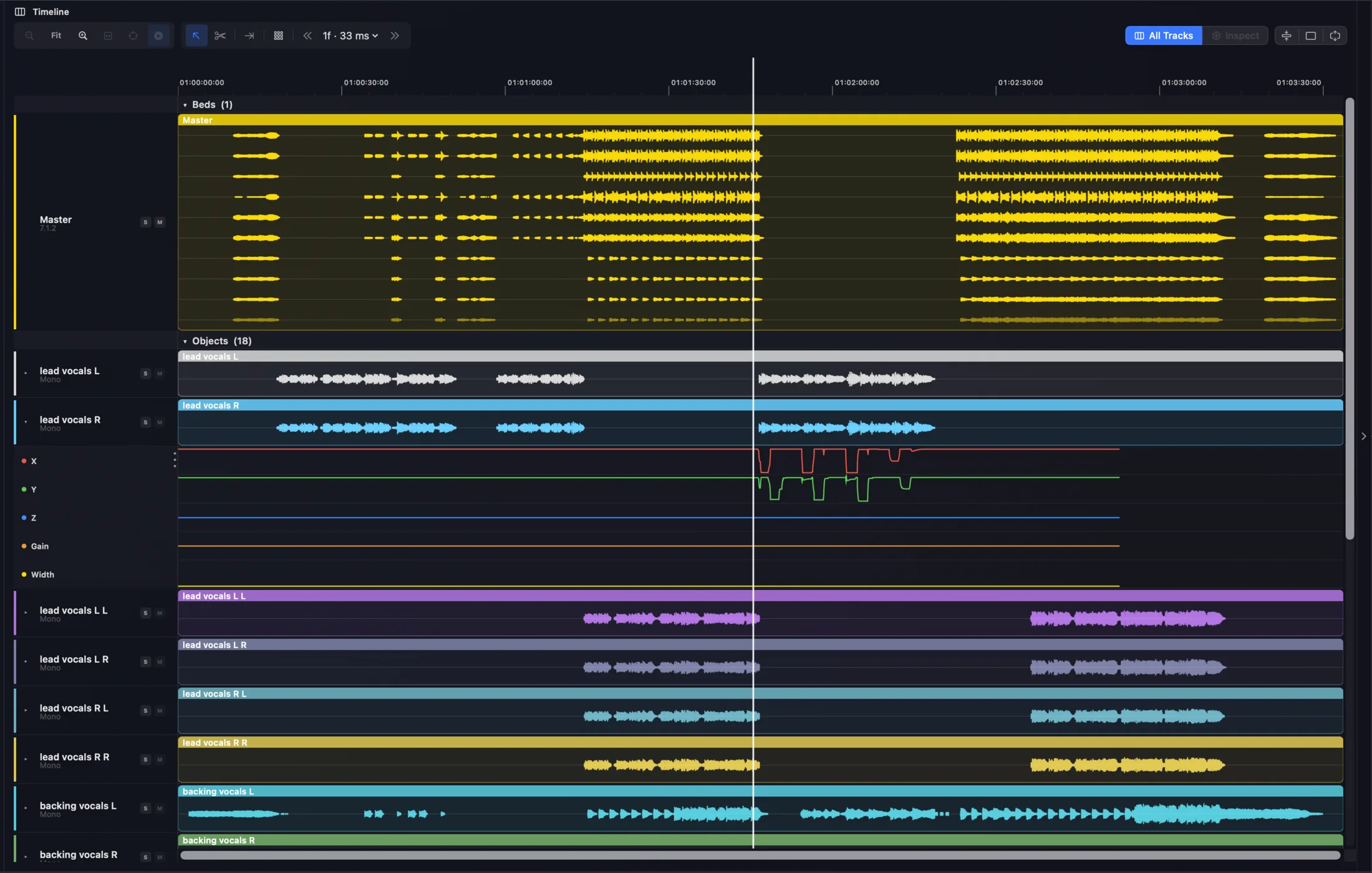
Your whole master laid out as colour-coded waveforms — beds, objects and stems — with per-track solo, looping and markers. Read automation, spot a dead channel, scrub anywhere.

Beds · objects · stemsPer-track soloMarkers
Orbit Pro timeline tracks — colour-coded beds, objects and stems with per-track waveforms and a playhead
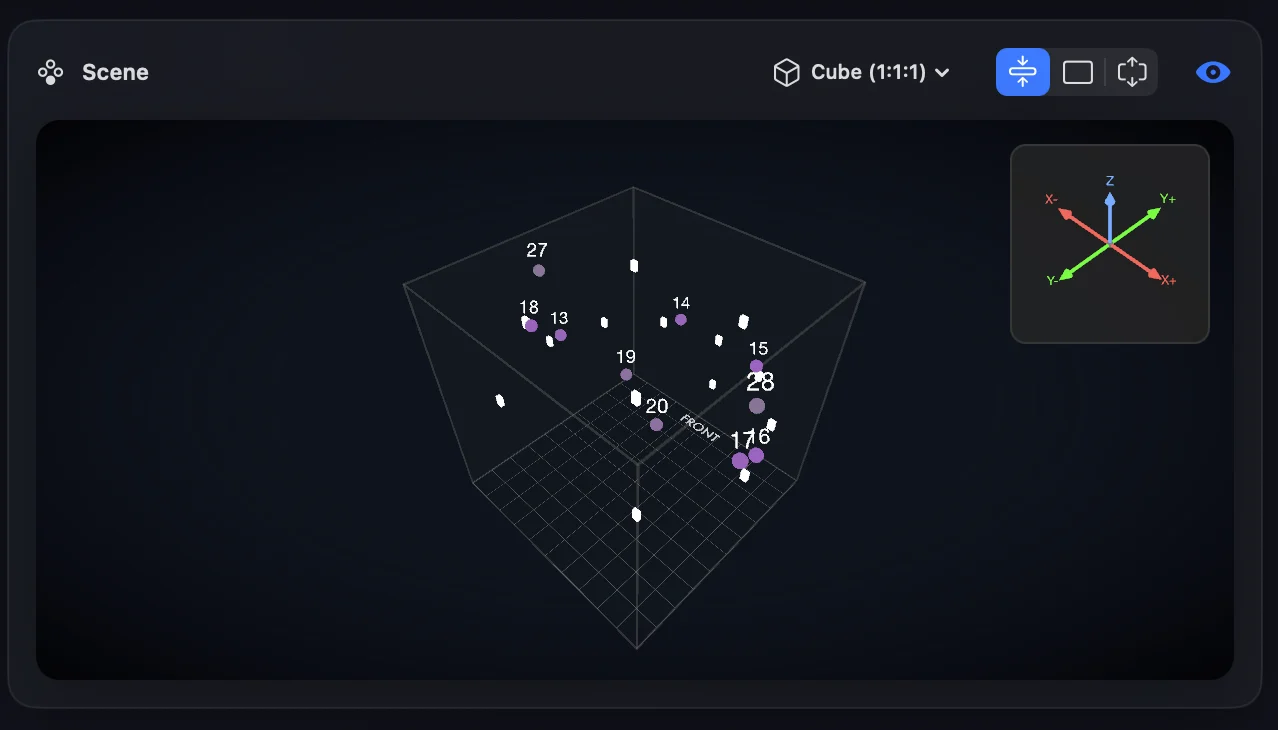
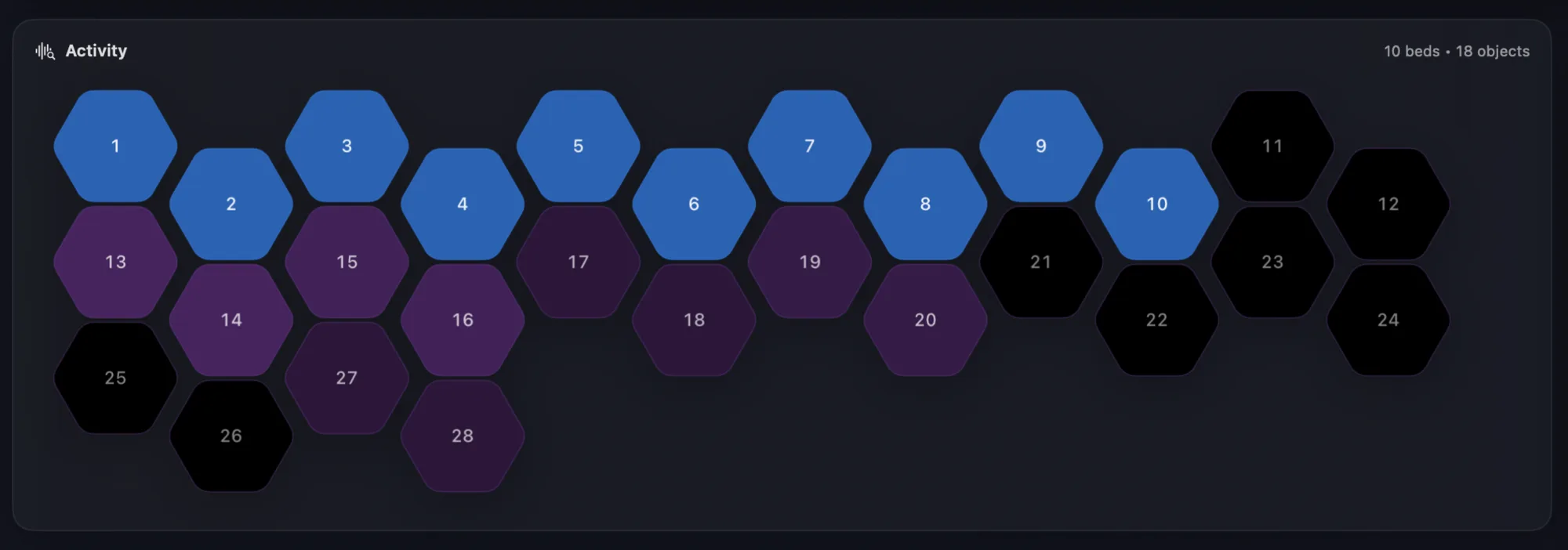
Orbit Pro scene panel — every object plotted by number inside the room cubeOrbit Pro activity grid — a hexagon per bed and object, lit while it plays
The scene and activity grid dock to the right of the timeline, live as the file plays.
Overview

Your whole session, at a glance

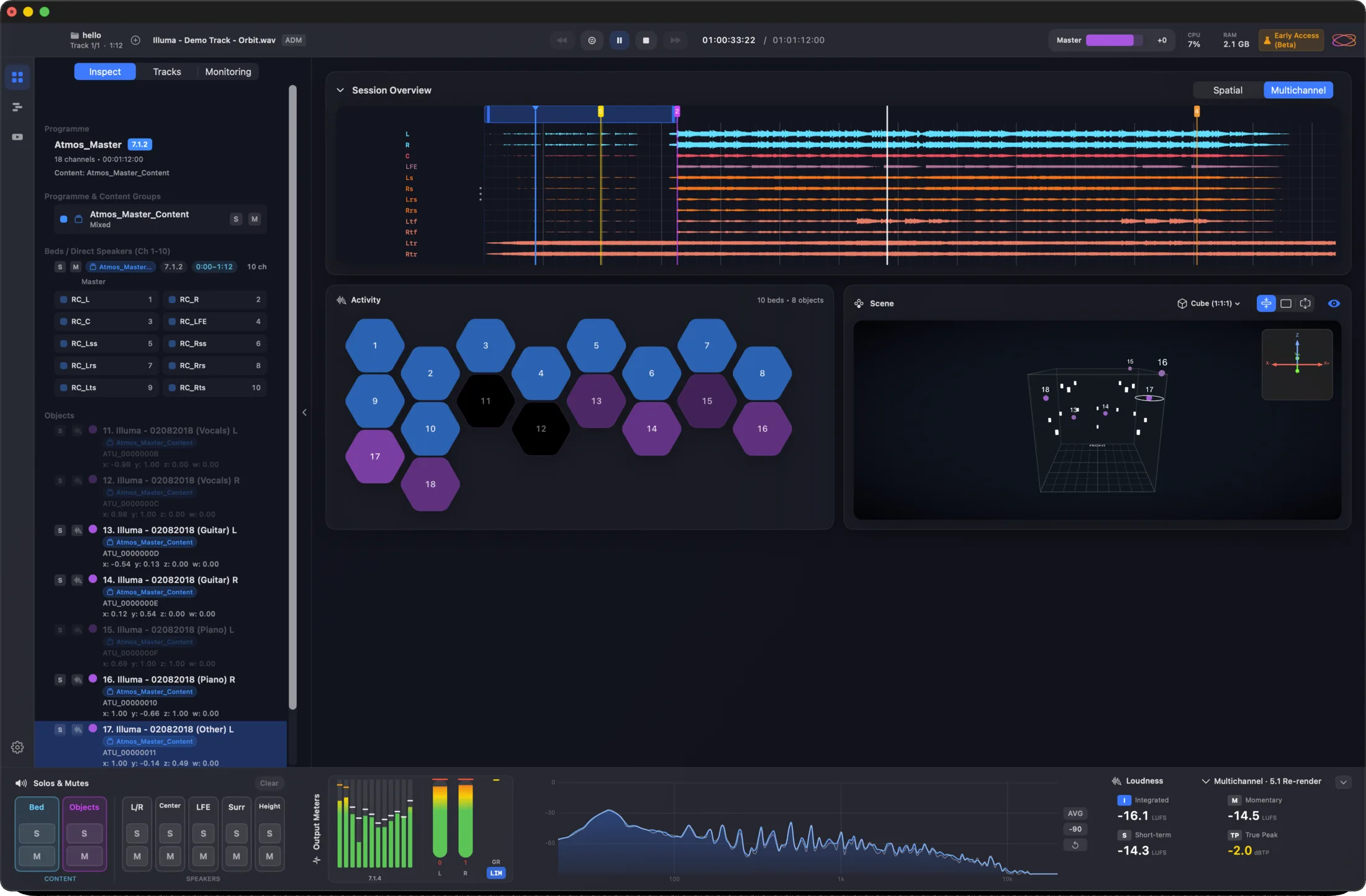
Read a master on one screen instead of four.

Session waveforms across the top, activity grid and 3D scene side by side, full metering below — the original Orbit view, refined.

Activity grid3D sceneLoudness by Cota
Orbit Pro Overview — session waveforms, activity grid, 3D scene and metering
Real-time analyser — a fluid, detailed frequency spectrum
A real-time analyser, right in the meter bridge.
Object Activity

Every object, moving in real time

Understand a complex mix in one pass, not four.

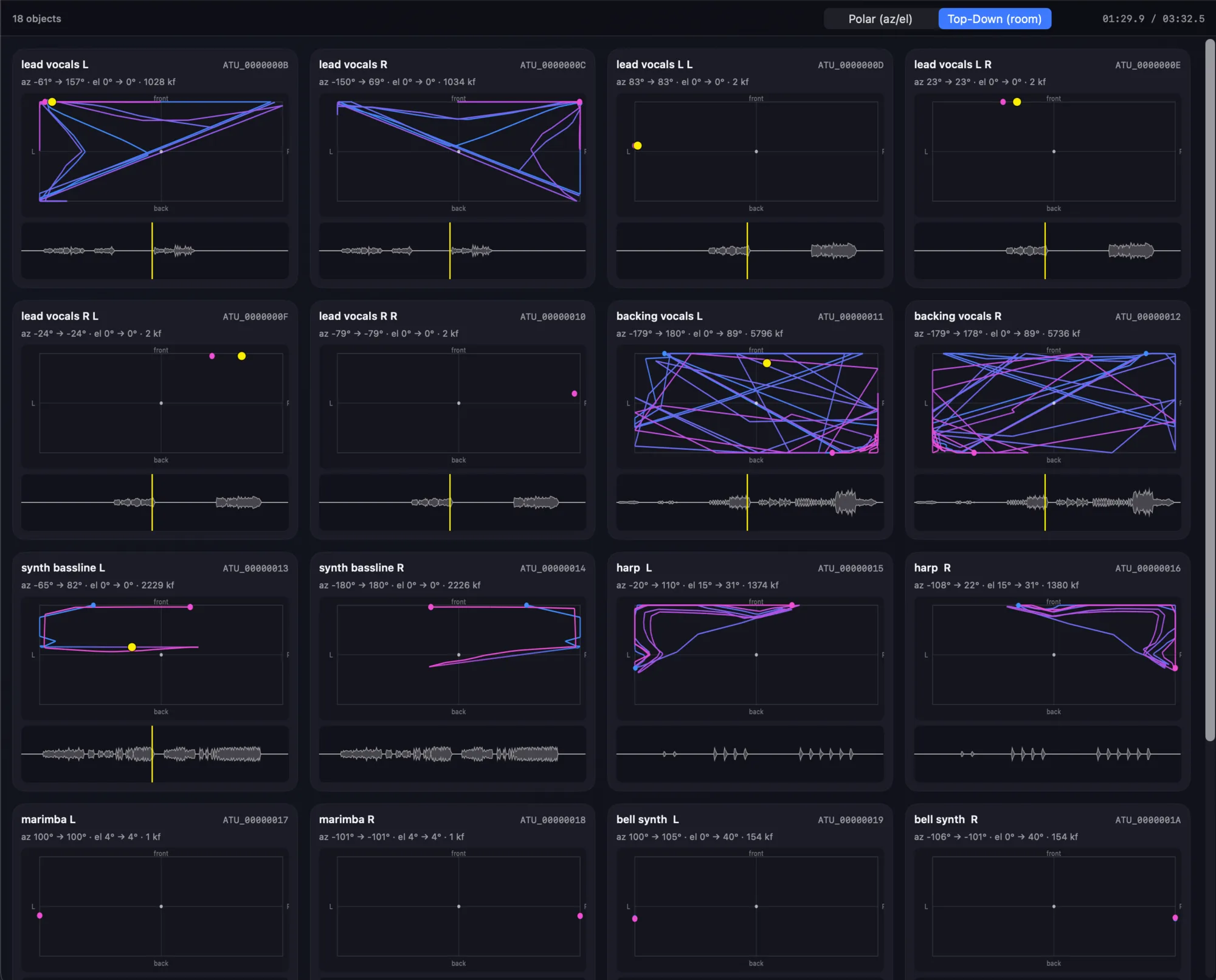
A Pro-only window that traces every object’s path as it plays — top-down or polar — alongside its waveform and live position.

Pro onlyReal-time pathsTop-down · polar
Orbit Pro Object Activity window — every object with its movement trajectory, waveform and position
Speaker layout

Solo a speaker by clicking it

Test the rig without leaving the session.

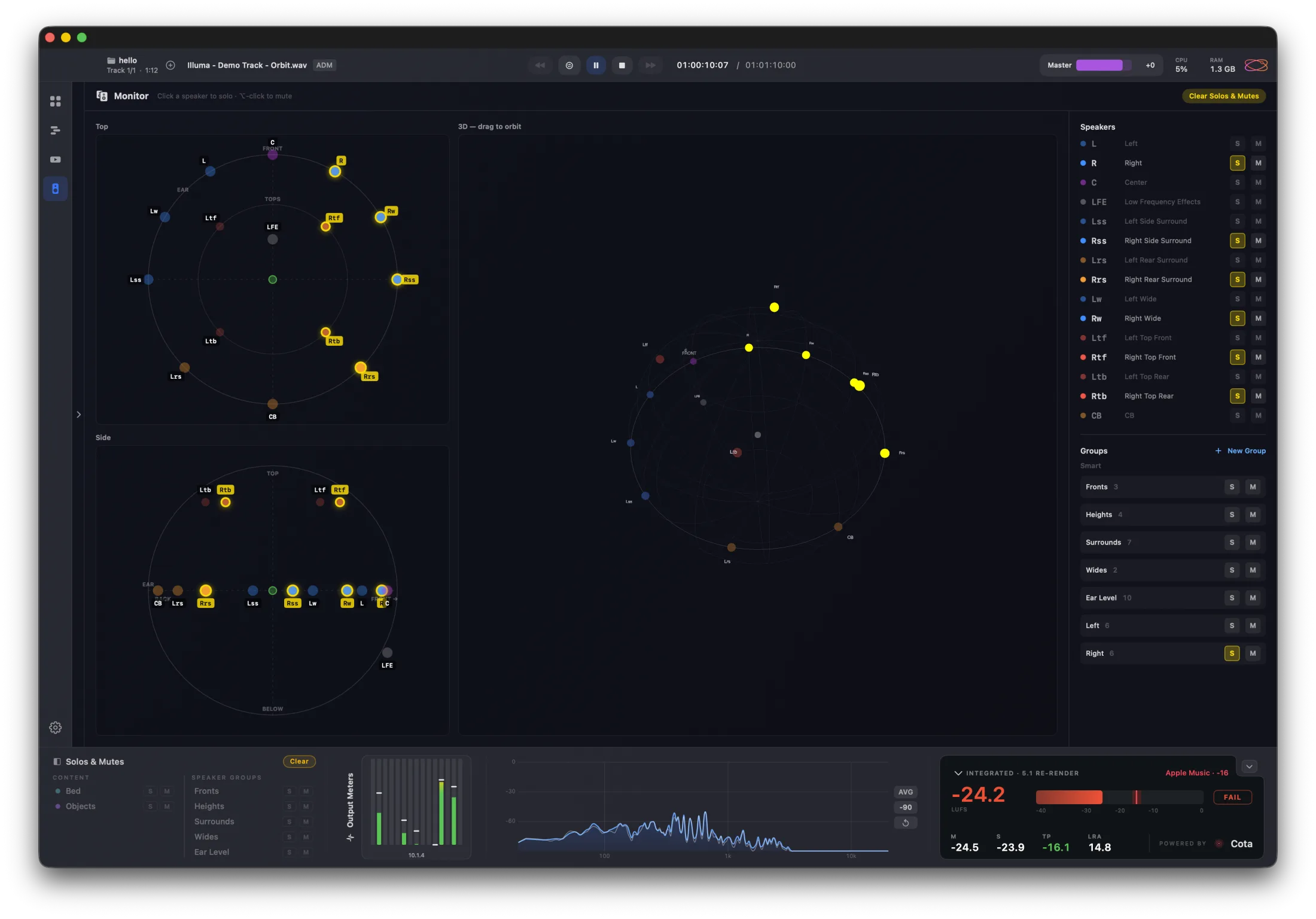
Top-down, side and 3D views with per-speaker solo, mute and custom groups that follow you everywhere. Any layout up to 64 channels via OSLS.

Pro onlySolo · mute · groupsAny OSLS layout
Orbit Pro’s speaker layout view — top-down, side and 3D layouts with per-speaker solo/mute and custom groups
Video

A real NLE, built in

Cut the video without leaving Orbit.

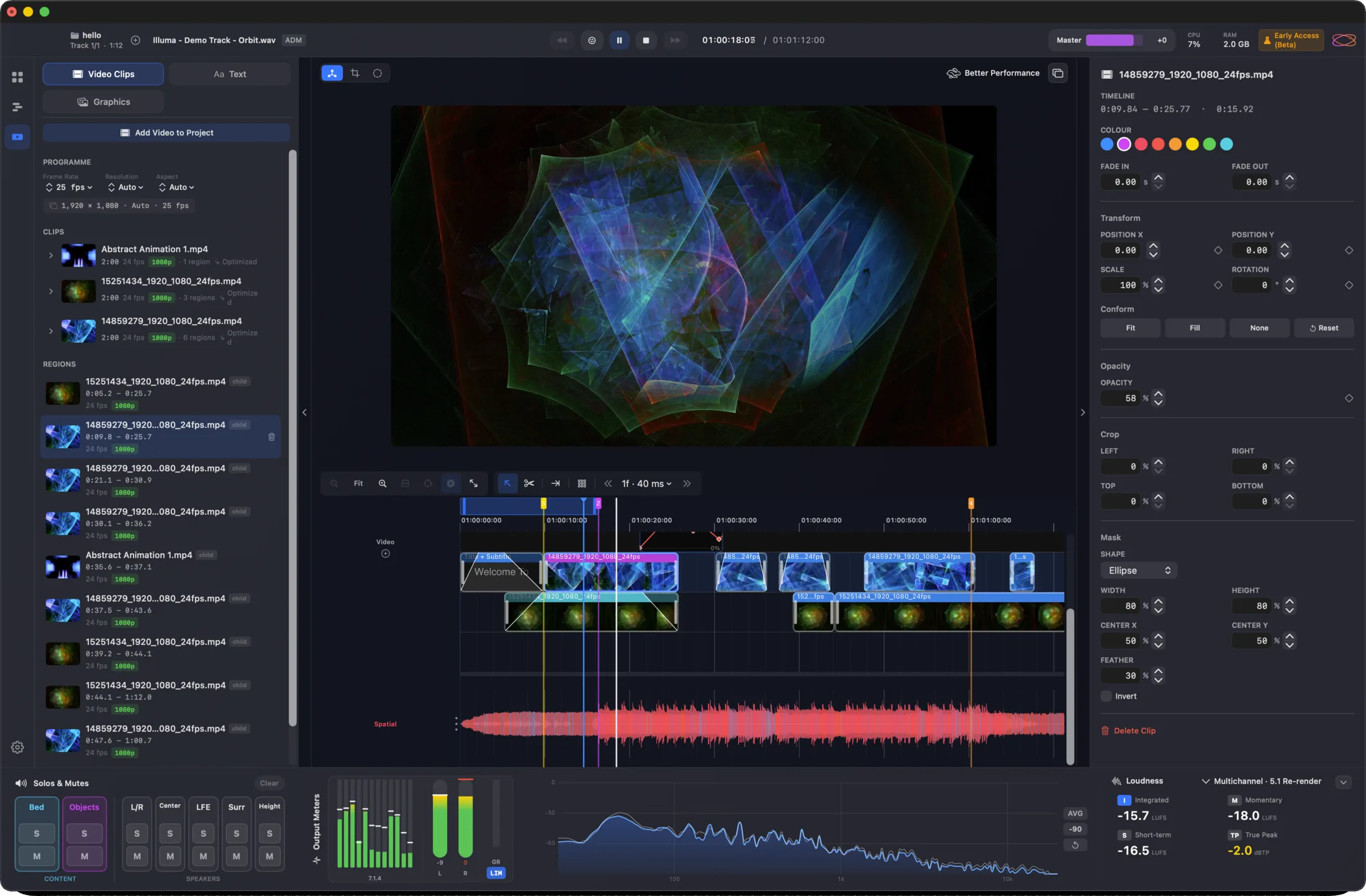
Enough editor to finish a music video or podcast bound for IAMF — up to 4K, proxy generation, text and graphics. Or just drag your video in.

Up to 4KProxiesText & graphics
Orbit Pro built-in video editor — preview, clip timeline and inspector
IAMF export

Quite possibly the world’s most advanced IAMF export

Hear exactly how the file will sound before you ship it.

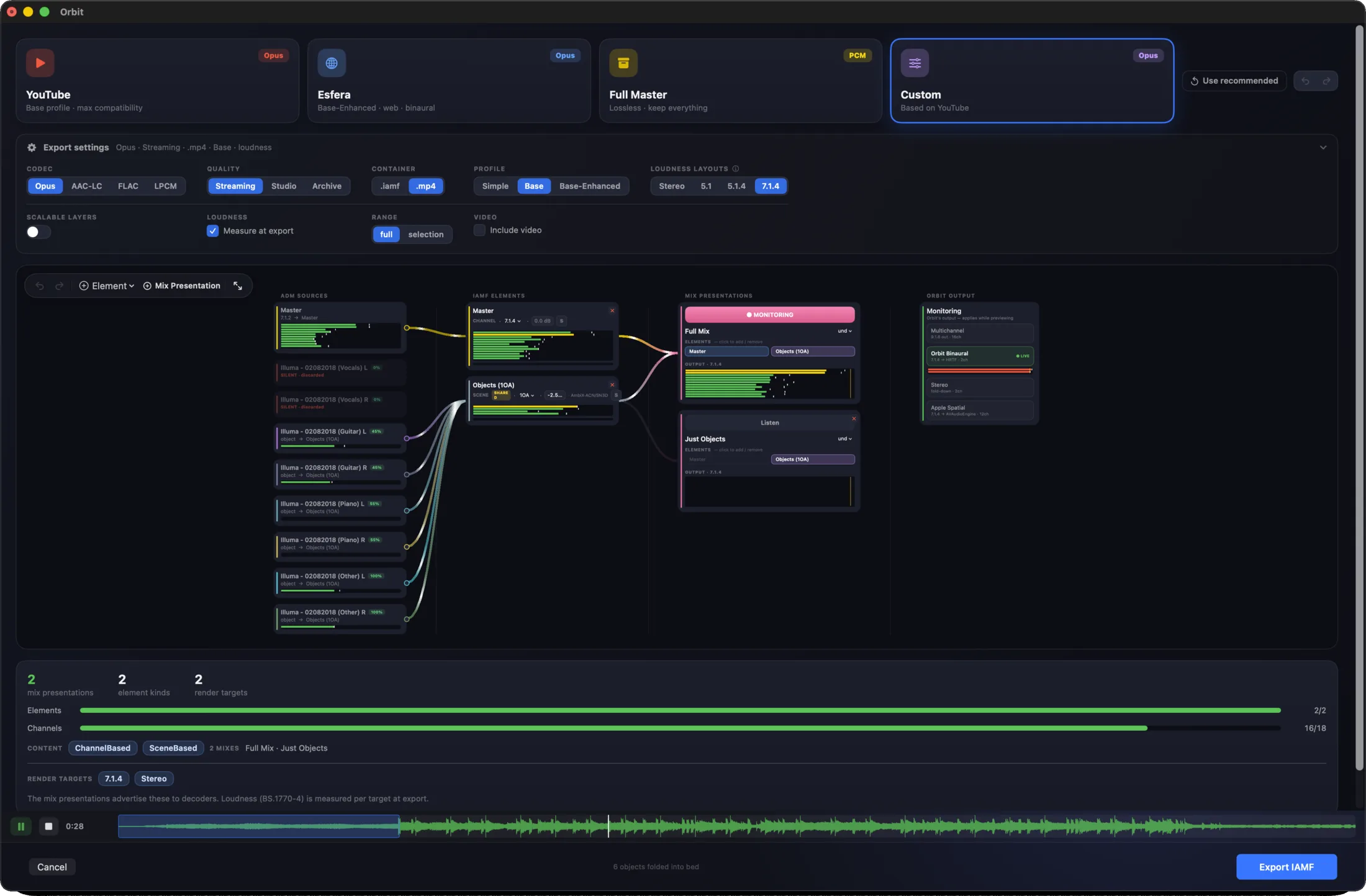
A routing graph for taking ADM, EBU or Atmos to IAMF — auto-route presets for YouTube and Esfera, live monitoring as objects fold into ambisonics, and Mix Presentations for alternate versions.

Auto-route presetsObjects → FOAMix Presentations
Orbit Pro IAMF export routing graph with auto-route presets and mix presentations
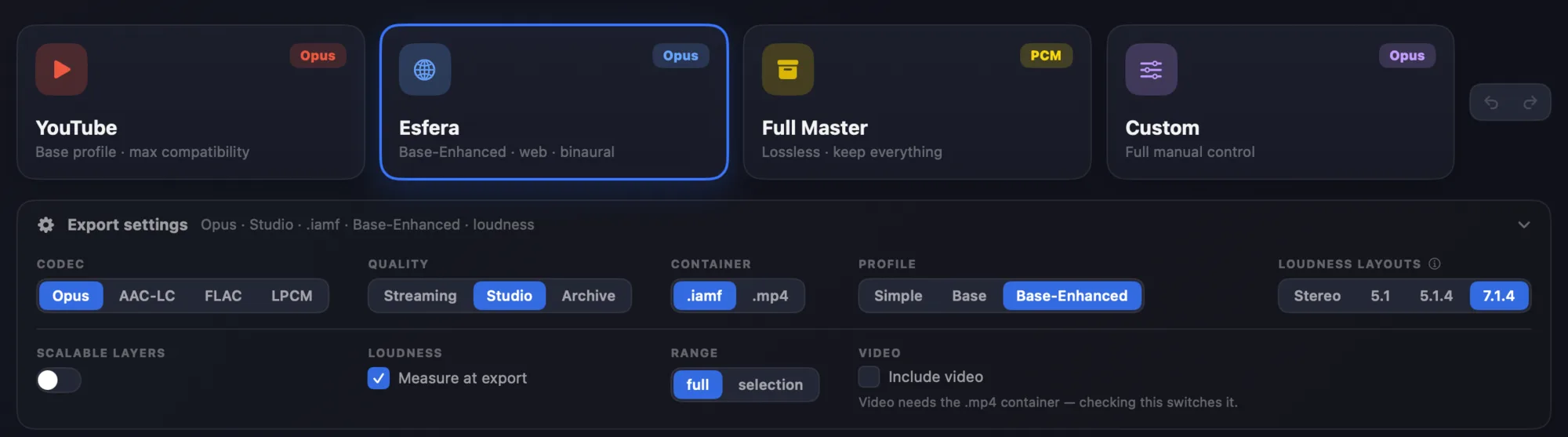
IAMF export presets — YouTube, Esfera, Full Master, Custom — with codec, quality and profile settings
Start from a preset, or take full manual control.

+ object inspection, head tracking, themes and more — see every Pro feature →

What it opens

Reads your masters exactly as they are — and takes them where they need to go.

ADM BWF
Dolby Atmos mastersEBU broadcast ADMBeds & objectsOwn rendering engine
IAMF
1.0 · 1.1 · 2.0Eclipsa AudioMix presentations
Export
ADM → IAMFWith or without videoYouTube · Esfera presets
Layouts
Quad → 9.1.6Up to 64 channelsOSLS custom
ADM → Eclipsa

Take an Atmos master to Eclipsa Audio, live on YouTube.

Export to IAMF with the built-in YouTube preset and upload the IAMF on its own. YouTube serves it back as Eclipsa Audio on compatible devices, and builds stereo and 5.1 from the same master. We ran the whole round-trip end to end.

Built-in YouTube presetEclipsa on compatible devicesVerified end to end
Speaker formats

From Quad to any layout you can build.

Presets
Quad5.15.1.47.1.49.1.49.1.6
Coming soon
5.1.27.1.2
Custom

Any rig up to 64 channels via OSLS, our open layout format. Binaural and stereo fold-downs stay consistent across every layout.

Which is right for you

Four ways in.

New to Orbit

Get the full Pro toolset.

Buy Pro — £229
Just want to try it

Free for 14 days, no card.

Start free trial
Already own Standard

Pay only the difference, applied at checkout.

Upgrade to Pro
Student or teacher

Verified education pricing.

Pro Education — £149
Pro or Standard

Same engine. Pro adds the tools.

Every edition shares the same audio engine, the same monitoring and the same ADM fidelity. Pro adds finishing, export and review on top.

Orbit Standard
One-time
£99
  • ADM BWF playback — 7.1.4 / binaural / stereo
  • Loudness metering — powered by Cota (BS.1770-5)
  • Custom speaker layouts up to 64ch — OSLS
  • ADM audit + object inspection
  • Session save & restore
  • Free updates within major version
Orbit Pro
14-day free trial · no subscription
£229
  • Everything in Standard
  • IAMF / Eclipsa export graph
  • Built-in video editor (NLE) up to 4K
  • Full timeline — per-track solo, looping, markers
  • 3D scene + activity views
  • Speaker layout view — solo, mute & custom groups
  • Per-object markers + PDF reports
  • All-tracks view & auto-play playlist
Education

Verified students and teachers get the full Pro toolset at £149. Same features, same updates.

Pro Education — £149
Minimum system requirements

These are floors — what the machine needs, not what the app uses. Its own footprint is a small fraction of the numbers below.

Operating system

macOS 14 (Sonoma) or later

Mac

Apple Silicon — M1 or later

Intel Macs are not supported. Orbit is built for Apple Silicon only.

Memory

8 GB RAM

Every Apple Silicon Mac ships with at least this. It is what the Mac needs, not what Orbit takes — the app sits at around 200 MB, rising to roughly 2 GB with a large master loaded.

Storage

1 GB free

The app itself is a fraction of this. Video projects and their proxies need room of their own.

Activations

Two Macs per licence

The studio machine and a laptop, say. Sign out on a device whenever you like and its activation frees up straight away, ready to use somewhere else.

Licence & internet
Free trial
A continuous internet connection, for as long as the trial runs.
One-time licence
Works offline. It only has to reach us once every 30 days to stay active.
Subscription
Coming soon. A constant connection — the licence refreshes every 24 hours.

Try Orbit Pro free for 14 days.

The full Pro feature set, no card and no commitment. Buy whenever you're ready.

macOSApple Silicon · macOS 14+ AccountRequired · one trial each